

You have tried updating your card. You have checked your bank balance. But the “Payment Revision Needed” error just won’t go away.
At this point, you don’t need another troubleshooting guide-you need a human.
The problem is, Amazon has made it incredibly difficult to find a phone number. If you click “Help,” you are trapped in an endless loop of help articles and a chatbot that doesn’t understand “technical glitches.”
If you are stuck, here is the Bypass Guide to reach a real human agent in under 2 minutes, and the exact script you should use to get your account unlocked.
⚠️ Before You Call: Do the “Quick Check”
Support agents are trained to dismiss you if you haven’t done the basics. If you get on the phone and say “my card isn’t working,” they will just tell you to call your bank.
Before you contact them, make sure you have:
- Cleared the Technical Loop: Have you tried the “Desktop Mode” trick?
- Check our guide: How to Fix the Amazon Payment Revision Loop
- Ruled Out Bank Blocks: Are you sure it’s not a daily limit or AVS mismatch?
- Check our guide: Why Amazon Declines Payments Even With Money
- Verify transaction: Verify that the transaction isn’t just an authorization hold.
- Check our guide: Amazon’s Payment Timing Policies
If you have done both of these and it’s still stuck, proceed to Method 1.
Method 1: The “Call Me Back” Feature (The Fastest Way)
Do not search for “Amazon Phone Number” on Google. Most numbers you find are scams or disconnected lines.
Amazon uses a “Call Me Back” system where you enter your number, and they call you instantly. This connects you to a higher-tier agent than the general support line.
The Step-by-Step Path (2025 Update):
The menu changes constantly. As of 2025, here is the hidden path:
On the Amazon Mobile App:
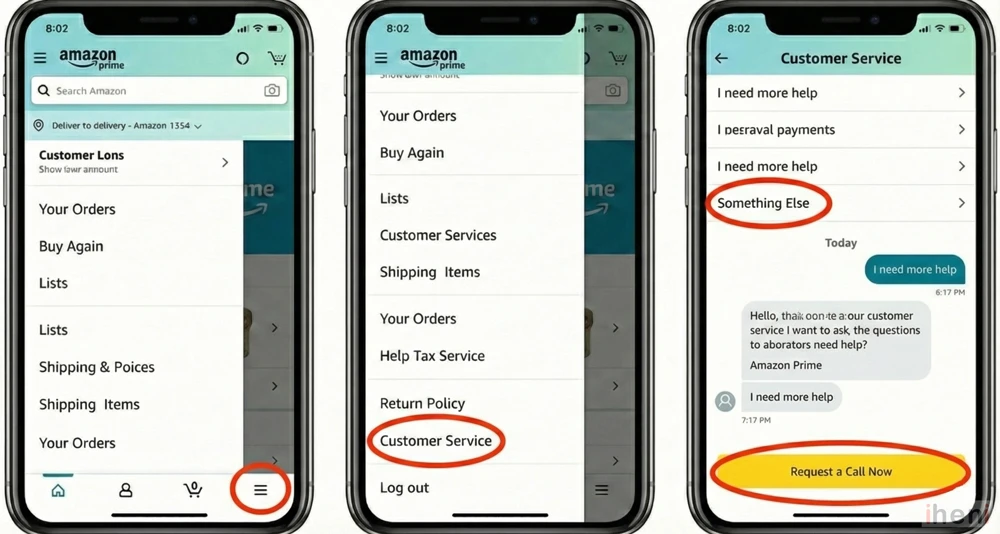
- Tap the Menu (≡) icon in the bottom right.
- Scroll down and tap Customer Service.
- Tap “Something Else” (Do not tap “My Order” yet, or it will just show you tracking info).
- Tap “I need more help”.
- A chat window will open. Do not chat. Look for the button at the bottom that says “Request a Call Now”.
On Desktop:
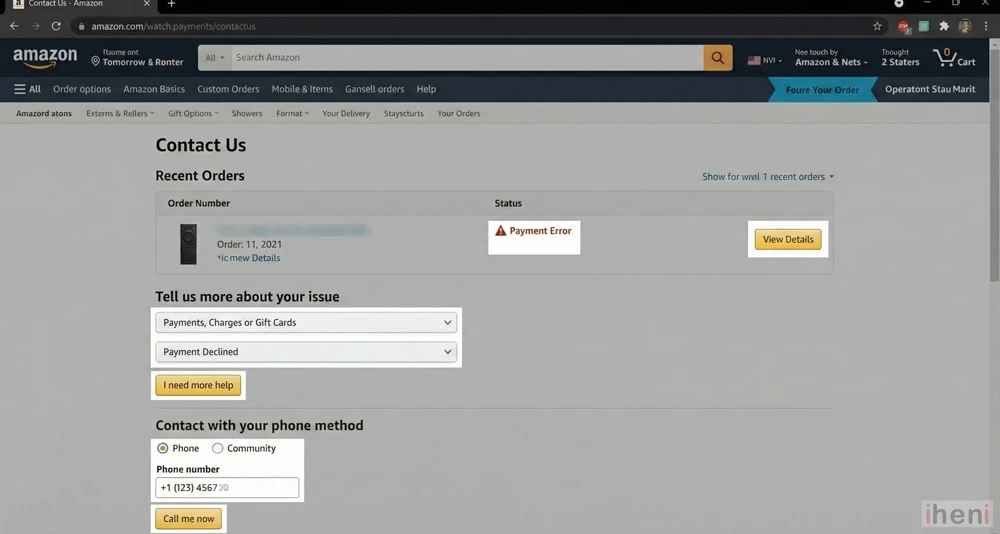
- Go to the Amazon Contact Us Page.
- You will see your recent orders. Click the order with the payment error.
- Under “Tell us more,” select “Payments, Charges or Gift Cards” > “Payment Declined”.
- Click “I need more help”.
- Click “Phone” and enter your number. Your phone will ring in less than 60 seconds.
Method 2: The Chatbot “Cheat Code”
If you prefer chat (or if the phone option is grayed out), you need to know how to break the bot. The Amazon automated assistant is designed to keep you away from humans.
The Trigger Words:
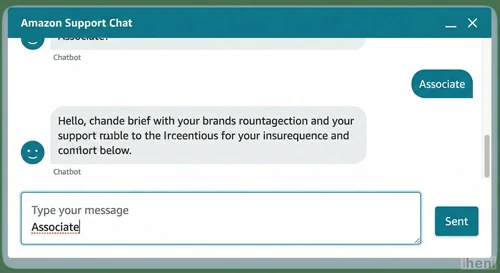
To force a transfer to a human, open the chat and type one of these keywords 3 times in a row:
- “Associate“
- “Talk to an agent“
- “Payment Blocked“
Do not answer the bot’s questions.
Bot: “I can help with that. Is this about the socks you ordered?”
You: “Associate”
Bot: “Okay, I can connect you. What is the issue?”
You: “Associate”
Usually, after the second or third attempt, the bot will say: “Okay, connecting you to a associate now…”
Method 3: The “Public Pressure” Option (Twitter/X)
If the app is crashing or you are locked out of your account entirely, use X (formerly Twitter).
- Tweet at: @AmazonHelp
- What to say: “@AmazonHelp I am stuck in a payment revision loop on Order #[Number]. My bank confirms funds are available. Support chat is down. Please help.”
Do not post your personal details publicly! They will reply with a secure link to a specialized support team.
📝 The “Script”: What to Say to the Agent
This is where most people fail. If you just say “My card is declined,” the agent will blame your bank. You need to sound like you know exactly what is wrong.
Use this script:
“Hi, I am calling about Order #[Order Number].
I am receiving a ‘Payment Revision Needed’ error, but I have already called my bank and they confirmed the account has funds and they are NOT seeing any decline attempts on their end.
It seems like my Amazon account is stuck in a technical loop or there is a security flag. Can you please manually refresh the Authorization Token or check if an ‘AVS Mismatch’ is blocking the charge?”
Why this works:
- “Not seeing decline attempts”: This proves the error is on Amazon’s side, not the bank’s.
- “Authorization Token”: This is the technical term for the digital handshake between Amazon and Visa/Mastercard. Asking to refresh it forces the agent to use their advanced tools.
Summary Checklist
- Try the [Loop Fix] first (Desktop trick).
- Use the “Call Me Back” feature in the app (don’t call random numbers).
- Use the Script above to prove it’s an Amazon glitch.
Did this guide help you reach a human?
Let us know in the comments how long it took for Amazon to call you back!

