

Did you wake up to a $0.99, $3.99, or $11.99 charge labeled “AMZN DIGITAL” or “Amazon Digital Svcs”?
If you haven’t bought any physical products recently, seeing this charge can be confusing. You might worry that your card details have been compromised.
Don’t panic. In 99% of cases, this is not fraud.
This guide will explain exactly what “Digital Svcs” means, help you match the dollar amount to the specific service, and show you how to find the hidden “Digital Orders” menu to cancel it.
What Does “Amazon Digital Svcs” Mean?
“Amazon Digital Svcs” (or AMZN Digital) is the billing descriptor Amazon’s official payment system uses for intangible products.
Unlike a physical box delivered to your doorstep, these are instant downloads or streaming services. Common examples include:
- Kindle eBooks
- Prime Video Movie Rentals
- Audible Credits
- App Subscriptions (via Fire TV or Fire Tablet)
- In-Game Currencies (Roblox, Candy Crush linked to Amazon)
⚠️ Note: If the charge is for a physical item from a third-party seller, it will usually appear as Amzn Mktp US instead.
Cheat Sheet: Identify the Charge by Amount
The fastest way to figure out what you bought is to look at the price. Match your bank statement to this table:
| Charge Amount | Likely Service |
|---|---|
| $0.99 | iCloud Storage (linked to Amazon) or Kindle Daily Deal |
| $3.99 – $5.99 | Prime Video Movie Rental (SD or HD) |
| $9.99 – $11.99 | Kindle Unlimited Subscription |
| $14.99 | HBO / Max / Starz Channel Add-on |
| $14.95 | Audible Premium Plus Monthly Membership |
| $16.99+ | Amazon Music Family Plan |
If the charge is exactly $14.99 or $139.00, it is likely a standard Amazon Prime PMTS charge for your main membership renewal, not a digital service.
Why Am I Being Charged? (Top 3 Reasons)
Most users are charged for one of these three reasons:
1. A Free Trial Expired
Did you sign up for a 30-day trial of Kindle Unlimited, Amazon Music, or a Prime Video Channel (like Starz or Paramount+)? When the trial ends, Amazon automatically charges your card for the next month.
2. The “1-Click” Trap
Amazon’s “1-Click Ordering” is often enabled by default on Kindle eReaders and Fire TV sticks.
- Scenario: You or a family member clicked “Buy Now” or “Rent” on a movie, thinking it was free or included with Prime.
- Result: You get an instant “Amazon Digital Svcs” charge.
3. In-App Purchases
If you have a Fire Tablet for your children, they may have purchased coins or gems inside a game. These charges route through Amazon Appstore and appear as “Digital Svcs.”
How to Find the “Hidden” Invoice
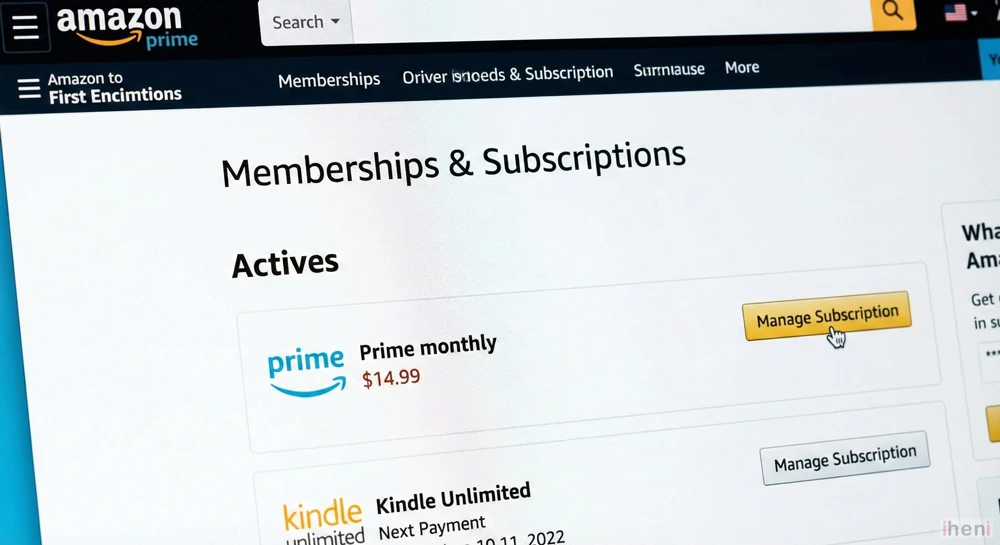
If you look at your normal order history, you won’t see these items. You must check the Digital Orders tab or your content library.
Step-by-Step:
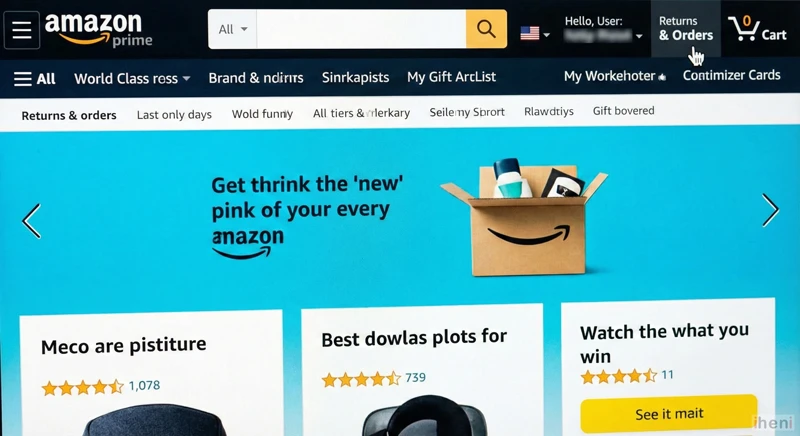
- First, log in to your Amazon account. From the homepage, click on the “Returns & Orders” link, which is usually located in the top right corner.
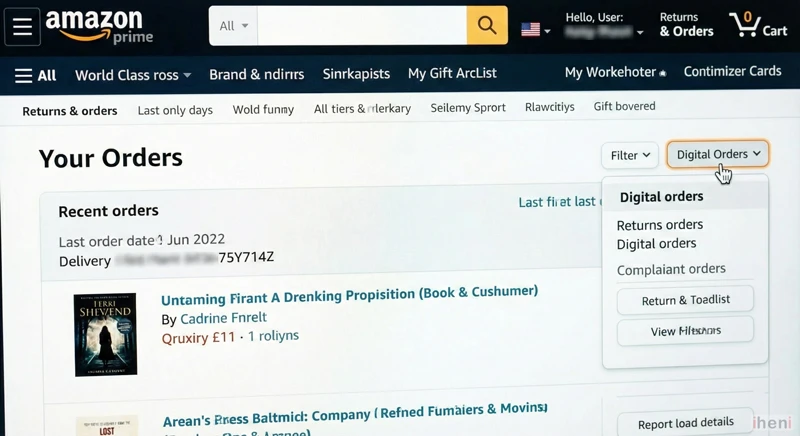
- On the “Your Orders” page, you will see a list of your recent physical purchases. To find digital items, click on the “Filter” drop-down menu and select “Digital Orders”.
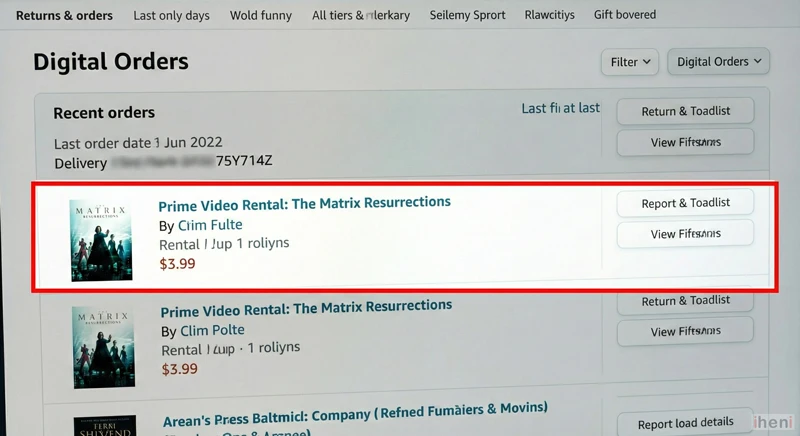
- The list will now show only your digital purchases, such as eBook downloads and movie rentals. Scroll through this list to find the order that matches the date and amount on your bank statement.
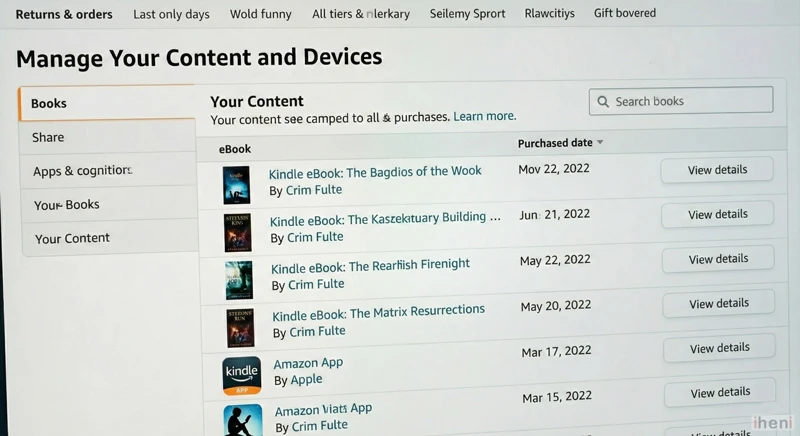
- As an alternative, you can go to the “Manage Your Content and Devices“ dashboard. This page lists all your active Kindle books, apps, and other digital content, which can help you identify where a charge originated.
How to Cancel & Get a Refund
Can I get my money back?
For Movie Rentals: If you have not pressed play or downloaded the video, you can usually cancel the order within 48 hours for a full refund.
For eBooks: You can return a Kindle book for a refund within 7 days of purchase.
Steps to Cancel:
- Go to the Digital Orders page mentioned above.
- Find the item.
- Click “Return for Refund” (if eligible) or “Manage Subscription” to turn off auto-renew.
Frequently Asked Questions
Is “Amazon Digital Svcs” a scam?
No, it is a legitimate transaction code. However, always verify the charge in your Amazon account before assuming it is real. Scammers sometimes send fake emails pretending to be a charge to get you to call a fake support number.
How do I turn off 1-Click purchasing?
To prevent accidental charges in the future, go to your Account Settings > 1-Click Settings and turn it off for your devices. This forces you to enter a password before buying movies or books.
What if the charge says “Mktplace”?
If your statement says “AMZN MKTP” or “Mktplace,” this refers to a physical product sold by a third-party seller. Read our specific guide on the Amzn Mktp US charge to understand how those payments work.
Why can’t I update my card for a digital purchase?
If you are trying to pay for a movie or eBook but Amazon keeps asking you to “Revise Payment Method” over and over, you are likely stuck in a glitch. Read our fix for the Amazon Payment Revision Loop.
Need More Help?
If you have checked your Digital Orders and still can’t find the source of the charge, someone else in your household might be using your card. You can contact Amazon Customer Service specifically for payment issues using our step-by-step guide on How to Contact Amazon Payment Support directly.

