

Have you noticed a transaction labeled “AMAZON PRIME PMTS” or “AMZN Mktplace PMTS” on your credit card statement?
If you didn’t buy anything recently, seeing an unexpected charge can be alarming. You might be wondering if your card was stolen or if this is a scam.
The good news: This is legitimate. The bad news: You are likely paying for a subscription you forgot about.
This guide will explain exactly what “PMTS” stands for, why this charge appeared, and how to find the hidden setting in your Amazon dashboard to cancel it.
What Does “Amazon Prime PMTS” Stand For?
In banking terms, PMTS is simply an abbreviation for PAYMENTS.
When you see AMAZON PRIME PMTS, it means Amazon’s automated billing system has processed a payment for a subscription service or a third-party seller.
Unlike a standard product purchase (which usually shows up as “AMZN Mktplace” or “Amazon.com”), the “Prime PMTS” descriptor is specifically used for:
- Recurring Memberships: Monthly or annual Prime renewals.
- Digital Channels: Subscriptions to channels like Starz, HBO, or Paramount+ inside Prime Video.
- Free Trials Ending: A 30-day free trial that has automatically converted into a paid membership.
Correction: Some outdated sources claim PMTS stands for “Principal Member of Technical Staff.” This is incorrect. In the context of your bank statement, it strictly refers to financial payments.
Cheat Sheet: Identify the Charge by the Amount
Often, the dollar amount is the biggest clue to what you are paying for. Check your bank statement against this table:
| Amount (Approx.) | Likely Cause |
|---|---|
| $14.99 | Standard Amazon Prime Monthly Membership |
| $139.00 | Amazon Prime Annual Membership renewal |
| $8.99 – $10.99 | Prime Video Standalone Subscription |
| $4.99 – $9.99 | Third-party Channel (Starz, AMC+, Discovery+) |
| $16.99+ | Amazon Music Unlimited Family Plan |
| $0.99 – $3.99 | Digital Movie Rental or Kindle eBook |
Step-by-Step: How to Find the “Hidden” Transaction
Many users check their standard “Order History” and see nothing there. That is because digital subscriptions do not show up in the standard order list.
Follow these steps to find the culprit:
Method 1: Check Memberships & Subscriptions
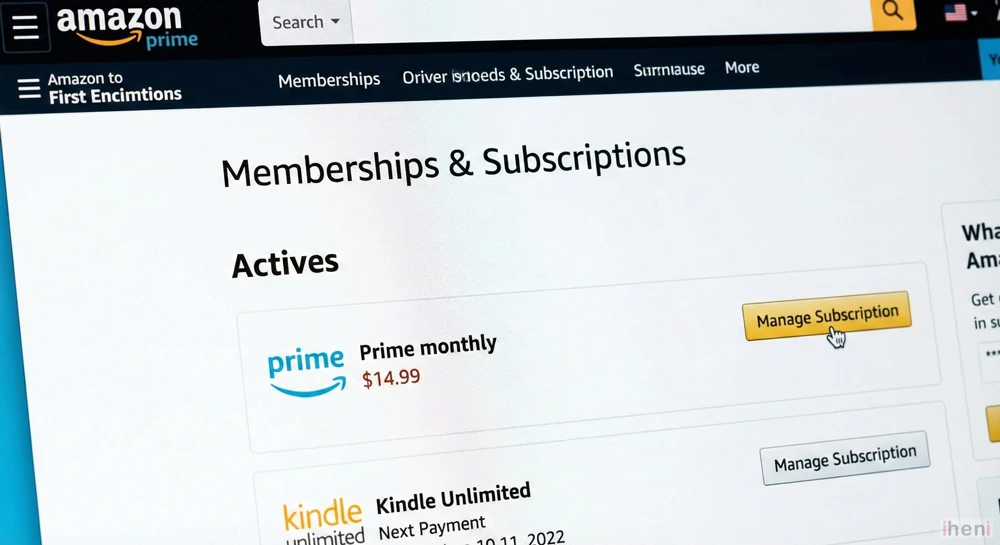
This is where 90% of “PMTS” charges are found.
- Log in to your Amazon account.
- Go to Account & Lists > Memberships & Subscriptions.
- Look for any active subscriptions (Prime, Kindle Unlimited, Audible).
- Check the “Next Payment Date” if it matches the date on your bank statement, you found it.
Method 2: Check “Digital Orders” (The Secret Folder)
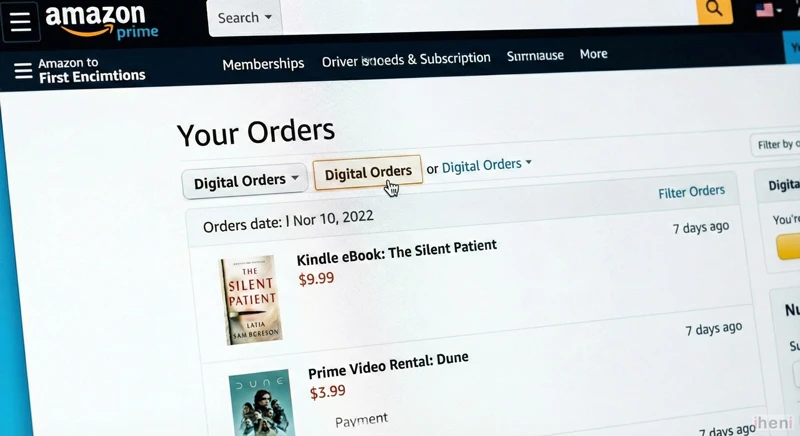
If you rented a movie or bought an eBook, it won’t be in your main order history.
- Go to Returns & Orders.
- Look for the tab or filter that says “Digital Orders” (usually on the top right of the order list).
- Here you will see apps, movie rentals, and in-game currency purchases that trigger “PMTS” charges.
Method 3: Check Prime Video Channels
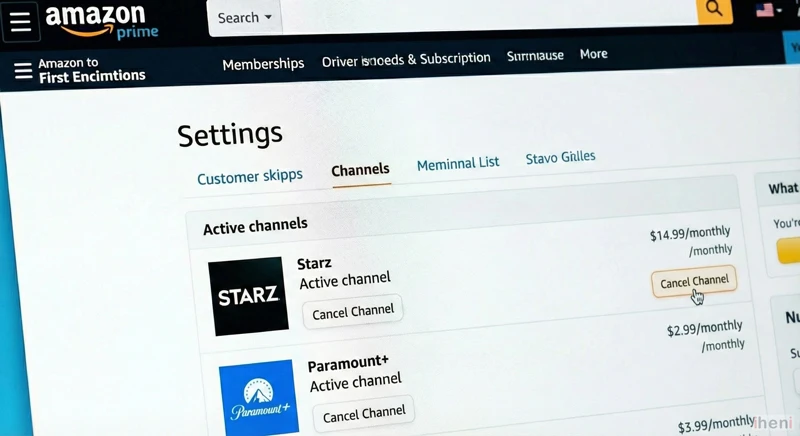
Did you accidentally click “Subscribe” on a TV show?
- Go to Prime Video settings.
- Click on Channels.
- Look for active third-party subscriptions like Paramount+ or Crunchyroll. These bill through Amazon but look like generic charges.
Can I Get a Refund?
Yes, Amazon is generally lenient with refunds if you catch the charge early.
- For Prime Membership: If you haven’t used the benefits (shipping or video) since the charge hit, you can cancel immediately. Amazon will often automatically refund the full amount for the unused period.
- For Digital Channels: Go to the subscription page and select “End Subscription.” You may need to contact Customer Chat to request a refund for the current month.
How to Contact Support for this Specific Issue
If you cannot find the charge in your dashboard, someone in your household (spouse/child) might be using your card on their account.
- Go to Amazon Customer Service (Chat).
- Type: “Unknown charge on my credit card.”
- Provide the Transaction ID from your bank statement (usually a string of numbers next to the charge). They can trace exactly which account made the purchase.
Frequently Asked Questions (FAQ)
Is Amazon Prime PMTS a scam?
No, it is a legitimate billing code from Amazon. However, scammers sometimes send fake emails claiming you have a charge to get you to click a link. Always check your actual bank statement and Amazon app; never click links in emails.
Why did I get charged if I canceled Prime?
You may have canceled “Prime Shipping” but left a “Prime Video Channel” (like HBO or Starz) active. These are billed separately.
Does PMTS mean Marketplace?
It can. If you see ‘Mktplace’ or ‘MKTP’ in the descriptor, read our specific guide on the AMZN MKTP US charge to learn how third-party seller billing works.

